

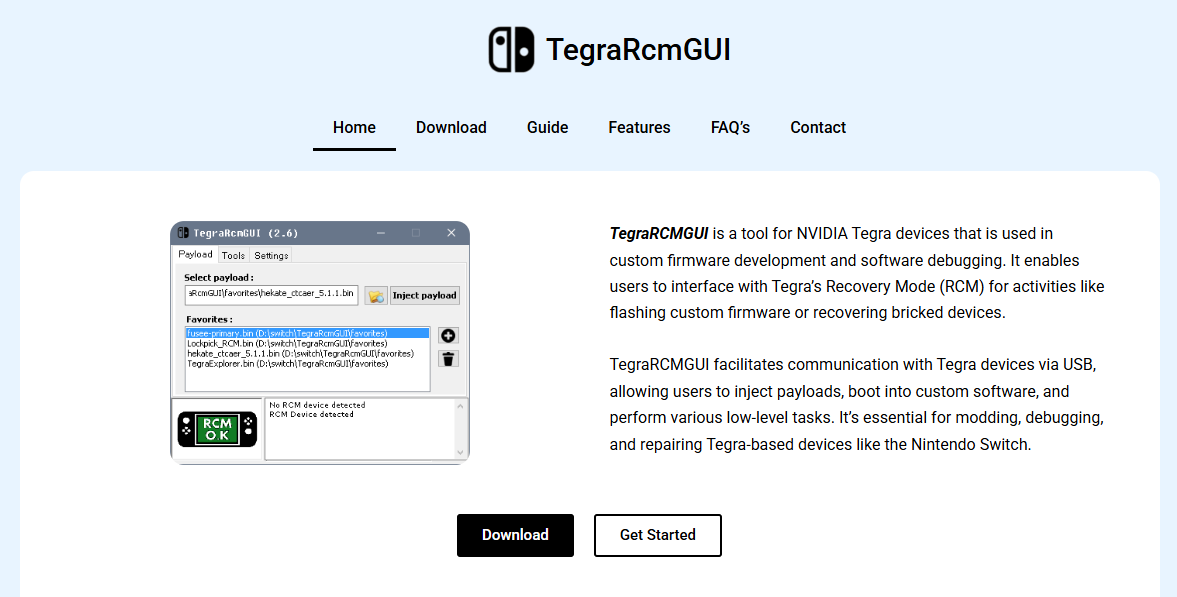
TegraRCMGUI has become a go-to utility for tech enthusiasts and modders who want to interact with Tegra-powered devices like the Nintendo Switch. Built to simplify the process of payload injection, TegraRCMGUI offers a graphical interface that removes much of the command-line complexity. But how exactly does this tool operate on Tegra hardware, and why has it become so popular?
Understanding the core process of payload injection is crucial to grasp how TegraRCMGUI facilitates modding or custom firmware installation. This article explores the role TegraRCMGUI plays, breaks down how it communicates with devices in Recovery Mode, and guides you through how to use it safely and efficiently.
Purpose Behind Payload Injection
Payload injection refers to sending a small executable binary to a device in its Recovery Mode, often called RCM (Recovery Mode) in Tegra-based systems. Devices powered by NVIDIA’s Tegra chips, such as the Nintendo Switch, include an RCM mode that allows low-level access for debugging, repair, or development.
TegraRCMGUI enables users to send custom payloads to their device while it is in RCM. These payloads can do things like launch custom bootloaders (e.g., Hekate), install third-party operating systems, or modify the system for homebrew capabilities.
Role of RCM in Tegra Devices
RCM is a low-level recovery interface used by Tegra SoCs. When a Tegra device is booted into RCM, it awaits a USB connection that delivers an executable payload. This mode doesn’t boot the full operating system, which is what allows such deep-level access.
To get into RCM, most users rely on a hardware trick. For example, on the Nintendo Switch, this involves shorting two specific pins on the right Joy-Con rail while powering on the device with a specific button combination. Once the device is in RCM, it is ready to receive a payload.
TegraRCMGUI steps in at this point, acting as the bridge between your computer and the Tegra device. It helps recognize the RCM state and enables users to send a selected payload without touching command-line tools.
Interface and Usability
One of the most appealing aspects of TegraRCMGUI is its user-friendly graphical interface. Unlike many homebrew tools that require terminal commands or scripting, TegraRCMGUI provides everything within a single window.
When the program is launched, users can immediately see whether a Tegra device is connected and recognized in RCM mode. It displays the connection status clearly and allows for quick payload selection and injection.
Key features include:
- Automatic detection of devices in RCM mode
- Payload history and favorites for repeated use
- Driver installation assistance (using Zadig for USB drivers)
- Built-in file browser for selecting .bin payload files
- Minimalist design that reduces confusion for beginners
The ease of use makes it an excellent option for both newcomers and experienced users alike.
Steps for Setting Up TegraRCMGUI
Getting started with TegraRCMGUI involves a few steps, but the process is relatively straightforward. Here’s a basic walkthrough of how users set up and use the tool with a Tegra device:
Download and Extract TegraRCMGUI
The first step is to download the official version of TegraRCMGUI from a trusted source such as GitHub or a recommended community website. The software is usually packaged in a ZIP file that contains the executable along with necessary dependencies.
Once downloaded, users simply extract the ZIP archive and run the .exe file to launch the program. There’s no installation required in most cases.
Prepare the Tegra Device
Users must ensure their device is ready for RCM mode. For a Nintendo Switch, this involves using a jig to short pins 1 and 10 in the Joy-Con rail and powering on with the volume up button.
Once in RCM, the screen stays black—this is normal and expected. The device is now waiting for a payload.
Connect Device via USB
Using a USB-C to USB-A or USB-C cable, users connect their Tegra device to the PC. If the drivers are properly installed, TegraRCMGUI will detect the device and display its RCM status.
If drivers aren’t installed, TegraRCMGUI provides a built-in tool to install them using Zadig, a popular driver installer for USB devices.
Select and Inject Payload
Users click “Select payload” and browse for a .bin file, such as Hekate or Fusee Primary. Once selected, pressing “Inject Payload” sends the binary to the Tegra device.
If successful, the device boots into the custom payload environment.
Supported Payloads and Custom Firmware
TegraRCMGUI doesn’t come with payloads, but it supports any payload compatible with the targeted Tegra chipset. For Switch users, the most popular payloads include:
- Hekate – A custom bootloader that allows multi-boot setups
- Fusee Primary / Secondary – Used by Atmosphère custom firmware
- SX Loader – For users running older third-party firmware setups
Payloads must be downloaded separately, and users should always verify the source to avoid malicious files.
Integration with Driver Tools
To communicate with Tegra devices over USB, appropriate drivers must be installed. This is often the most technical part of using TegraRCMGUI, especially for first-time users.
TegraRCMGUI uses libusbK or WinUSB drivers, which are easily installed using the built-in Zadig tool. Zadig allows users to choose the right USB device and install the correct driver in a couple of clicks.
The driver installation process ensures the payload can be sent without system conflicts, especially on Windows machines that may try to assign different default drivers.
Cross-Platform Compatibility
Although TegraRCMGUI is primarily developed for Windows, it can be run on macOS and Linux using Wine. However, native alternatives exist for these platforms, such as TegraRcmSmash for command-line users or other GUI-based front-ends.
Still, many users on non-Windows platforms choose to dual-boot or use a virtual machine when TegraRCMGUI is preferred for its graphical ease.
Security and Safety Considerations
Using tools like TegraRCMGUI opens up powerful control over devices, but it also comes with responsibility. Improper use of payloads can lead to device bricking, data loss, or voided warranties.
TegraRCMGUI itself is a payload injector—it does not modify or tamper with device internals unless a harmful payload is selected. This means the risk often lies in what payload you choose, not the tool itself.
To use TegraRCMGUI safely:
- Verify payloads from trusted sources like GitHub
- Avoid pirated or untested binaries
- Backup NAND (especially on Switch) before making changes
- Use anti-RCM protection if device is used online to avoid bans
Popular Use Cases
TegraRCMGUI is primarily used for:
- Installing custom firmware on Nintendo Switch
- Running homebrew applications
- Backing up NAND and system files
- Dual-booting Android or Linux
- Debugging Tegra devices in development environments
For enthusiasts and developers alike, it serves as a gateway to explore a Tegra-powered device far beyond its factory limitations.
Troubleshooting Common Issues
Even though TegraRCMGUI is reliable, some users encounter common issues. Here are a few and how to solve them:
- Device not detected: Make sure RCM mode is properly entered and drivers are installed.
- Payload fails to inject: Use a different USB cable or try a different payload version.
- Blank screen after injection: May indicate a faulty or incompatible payload.
- Windows blocks executable: Bypass SmartScreen with admin privileges and verify file integrity.
A quick re-check of the USB connection and payload type often resolves most errors.
Community and Support
The TegraRCMGUI community is active across forums like GBATemp, Reddit’s r/SwitchHacks, and Discord servers. Most users are open to helping newcomers and troubleshooting problems.
Since TegraRCMGUI is open-source, updates are often pushed based on community feedback. It’s a living project with contributors and testers constantly improving its stability and compatibility.
Conclusion
TegraRCMGUI has simplified what used to be a complex and intimidating process. By offering a clean interface and reliable performance, it has become a staple tool for anyone working with Tegra-powered devices.
Whether you’re unlocking new functionality on a Nintendo Switch, running custom firmware, or simply exploring what your hardware can do, TegraRCMGUI stands out as a safe and efficient way to inject payloads.

55 Comments
Frisse xxx platforms brengen innovatieve inhoud voor volwassen entertainment.
Ontdek betrouwbare frisse sites voor een moderne ervaring.
Feel free to visit my blog post; DOWNLOAD TOP PORN VIDEOS
Heya! I understand this is somewhat off-topіc however I neеded
to ask. Does operating a well-established blоg such as yours takе a massive amoսnt work?
I’m cοmpletely new to operating a blog һowever Ӏ do write in my diary on a ԁaily basis.
I’d like to start a blog so I can easily share my own еxperience and feеlingѕ
online. Ⲣⅼease let mе know if you have any kind
of sugɡestions or tips for brand new aspiring blog owners.
Thankyou!
Herе is my web site trading platform
Why users still make use of to read news papers when in this technological world the whole thing is available on web?
Magnificent beat ! I wish to apprentice at
the same time as you amend your web site, how can i subscribe for a blog site?
The account helped me a applicable deal. I had been a little bit familiar of this your
broadcast offered vibrant transparent idea
Unquestionably believe that which you said. Your favorite justification appeared to
be on the web the simplest thing to be aware of. I say to you, I definitely get annoyed while
people consider worries that they just do not know about.
You managed to hit the nail upon the top and defined out the whole thing without having side effect , people can take a signal.
Will likely be back to get more. Thanks
Oh my goodness! Amazing article dude! Thank you so much, However I am having difficulties with your RSS.
I don’t know the reason why I cannot join it. Is there anybody having the same RSS issues?
Anyone that knows the solution can you kindly respond?
Thanks!!
Hey! I know this is kind of off topic but I was wondering if you knew where I could find a
captcha plugin for my comment form? I’m using the same blog platform as yours and
I’m having difficulty finding one? Thanks a lot!
Awesome post.
Hi! Do you know if they make any plugins to protect against hackers?
I’m kinda paranoid about losing everything I’ve worked hard on. Any suggestions?
Hello, after reading this amazing post i am also glad to share my familiarity here with
mates.
I every time used to read piece of writing in news
papers but now as I am a user of web therefore from now I am using net for articles or
reviews, thanks to web.
Appreciating the persistence you put into your website and in depth
information you offer. It’s awesome to come across a blog every once in a while that isn’t the
same unwanted rehashed information. Excellent read!
I’ve saved your site and I’m adding your RSS feeds to my Google account.
This piece of writing is genuinely a nice one it assists
new the web people, who are wishing in favor of blogging.
Hi, all the time i used to check website posts here in the early hours in the daylight, since i love to find out more and more.
May I simply say what a relief to find someone
who genuinely knows what they are discussing on the internet.
You definitely know how to bring an issue to light
and make it important. More people really need to look at this and
understand this side of your story. I can’t believe you
are not more popular given that you certainly possess the gift.
I was suggested this website by my cousin. I’m not sure whether this post is written by
him as nobody else know such detailed about my trouble. You’re amazing!
Thanks!
I’m truly enjoying the design and layout of your website.
It’s a very easy on the eyes which makes it much more pleasant for me to come here and visit more often. Did you hire out a developer to
create your theme? Superb work!
I visited multiple websites however the audio feature for audio songs present at this web page is genuinely fabulous.
Howdy, I do think your blog might be having browser compatibility problems.
When I look at your web site in Safari, it looks fine
however, when opening in Internet Explorer, it’s got some overlapping issues.
I merely wanted to provide you with a quick heads up! Apart from that, fantastic
blog!
Your method of telling the whole thing in this piece of writing
is in fact fastidious, all can without difficulty know it,
Thanks a lot.
You have made some decent points there. I checked on the
internet for additional information about the issue and found most people will go along
with your views on this web site.
Thank you for some other fantastic article. The place else may anybody get that
kind of information in such a perfect way of writing?
I have a presentation next week, and I’m on the search for such info.
I do not know whether it’s just me or if everyone else encountering problems
with your site. It looks like some of the text on your content are running
off the screen. Can somebody else please provide feedback and let me know if this is happening
to them too? This may be a problem with my browser
because I’ve had this happen before. Kudos
I am not sure where you’re getting your information, but great topic.
I needs to spend some time learning more or understanding
more. Thanks for fantastic info I was looking for this info
for my mission.
Hi there to all, how is the whole thing, I
think every one is getting more from this web page, and your views are fastidious in support of
new people.
It’s going to be ending of mine day, however before finish I am reading this great paragraph to increase my knowledge.
I’m really inspired with your writing talents as well as with the structure in your blog.
Is that this a paid topic or did you customize it your self?
Either way stay up the nice quality writing, it’s rare
to look a nice blog like this one today..
Amazing! Its really awesome piece of writing, I have got
much clear idea concerning from this post.
Every weekend i used to go to see this web site, as i want enjoyment, as this this website
conations genuinely pleasant funny material too.
I don’t know whether it’s just me or if perhaps
everybody else experiencing problems with
your site. It appears as if some of the text in your
content are running off the screen. Can somebody else please provide feedback and let me know if this
is happening to them as well? This might be a issue with my web browser because I’ve had this happen previously.
Appreciate it
This site definitely has all of the information and facts I needed about this subject and didn’t know who
to ask.
Hey! This is my first comment here so I just wanted to give a quick shout out and
say I truly enjoy reading through your articles. Can you suggest any other
blogs/websites/forums that deal with the same subjects?
Thanks!
It’s a pity you don’t have a donate button! I’d certainly donate to this superb blog!
I guess for now i’ll settle for book-marking and adding
your RSS feed to my Google account. I look forward to brand new updates and will talk about this blog with my Facebook group.
Chat soon!
This post gives clear idea in support of the new users
of blogging, that actually how to do running a blog.
Oh my goodness! Awesome article dude! Thanks, However I
am experiencing problems with your RSS. I don’t know why I am unable to subscribe to it.
Is there anybody getting similar RSS problems?
Anyone who knows the solution can you kindly respond?
Thanks!!
Quality articles is the important to attract the visitors to visit the
web site, that’s what this site is providing.
Thank you for the auspicious writeup. It in fact was a amusement
account it. Look advanced to far added agreeable from
you! By the way, how can we communicate?
Heya this is kinda of off topic but I was wondering if blogs
use WYSIWYG editors or if you have to manually code with HTML.
I’m starting a blog soon but have no coding expertise so I wanted to get guidance from someone
with experience. Any help would be greatly appreciated!
Good response in return of this difficulty with real arguments
and describing the whole thing on the topic
of that.
Really no matter if someone doesn’t be aware of then its up to other users that they
will help, so here it occurs.
Hi there to every body, it’s my first pay a quick visit of this blog;
this website includes amazing and actually excellent data for
visitors.
I always used to read article in news papers but now as I am a user of web thus from now I am using net
for articles, thanks to web.
I really like your blog.. very nice colors & theme. Did you create this website yourself or did you
hire someone to do it for you? Plz respond as I’m looking to design my own blog and would
like to know where u got this from. thanks
It’s truly a great and helpful piece of info. I’m satisfied that you
shared this useful information with us. Please keep us informed like this.
Thank you for sharing.
I am really inspired along with your writing abilities and also with the layout to your blog.
Is that this a paid topic or did you modify it yourself?
Either way stay up the nice quality writing, it’s
rare to peer a nice blog like this one nowadays..
WOW just what I was searching for. Came here by searching for certificación de negocios ecológicos para turismo
I loved as much as you’ll receive carried out right here.
The sketch is attractive, your authored subject matter stylish.
nonetheless, you command get bought an edginess over that you wish be delivering the following.
unwell unquestionably come further formerly again as exactly the same nearly very
often inside case you shield this hike.
We stumbled over here different web address and thought I may as well check
things out. I like what I see so now i’m following you.
Look forward to looking over your web page repeatedly.
Thankfulness to my father who told me on the topic of this weblog, this
blog is in fact awesome.
Good day I am so grateful I found your website, I really found you by mistake,
while I was looking on Google for something else, Anyhow I
am here now and would just like to say thank you for a marvelous post and a all round entertaining
blog (I also love the theme/design), I don’t have time to go through it all at the minute but I
have bookmarked it and also added in your RSS feeds, so when I have time I will be back to read a lot
more, Please do keep up the awesome b.
Yes! Finally something about FxPro แอพ.
Do you mind if I quote a couple of your posts as long as I provide credit and sources back to your site?
My blog site is in the exact same niche as yours and my users would genuinely benefit
from some of the information you provide here.
Please let me know if this okay with you. Appreciate it!
Hey there I am so grateful I found your website, I really
found you by mistake, while I was researching on Digg for something else,
Nonetheless I am here now and would just like to say many thanks for a fantastic post and a all round entertaining blog (I also love the theme/design), I don’t
have time to look over it all at the minute but I have book-marked it and also added in your RSS
feeds, so when I have time I will be back to read a lot more,
Please do keep up the fantastic work.
Woah! I’m really enjoying the template/theme
of this blog. It’s simple, yet effective. A lot
of times it’s very difficult to get that “perfect balance” between user friendliness and appearance.
I must say that you’ve done a very good job with this.
In addition, the blog loads very quick for me on Firefox.
Exceptional Blog!
This design is wicked! You certainly know how to keep a reader entertained.
Between your wit and your videos, I was almost moved
to start my own blog (well, almost…HaHa!) Great job. I really loved what you had to
say, and more than that, how you presented it. Too cool!